The Complete SEC Filing Reader

SECSift turns SEC EDGAR filings into clean, readable documents, with every word and number exactly as filed.

Try the Demo

Free accounts have access to every premium feature for NVIDIA (NVDA), Alibaba (BABA), and Celsius (CELH), with lower limits.

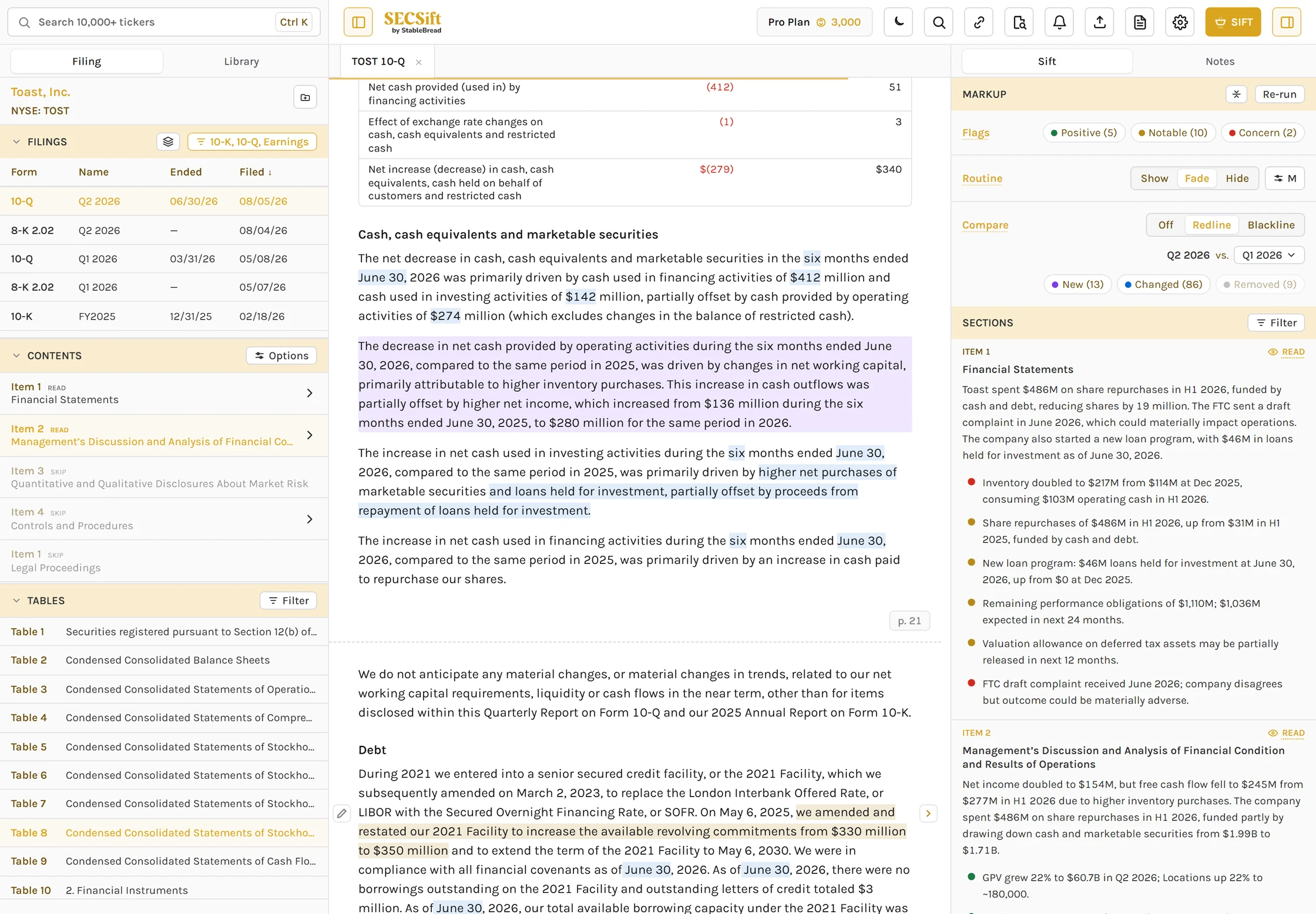
Toast's Q2 2026 10-Q in SECSift on a Pro account: the sidebar's filings, contents with Sift's labels, and tables, rows of the cash flow table, passages marked new and changed since Q1 2026, a Sift flag on the credit facility, and Sift's read of each section
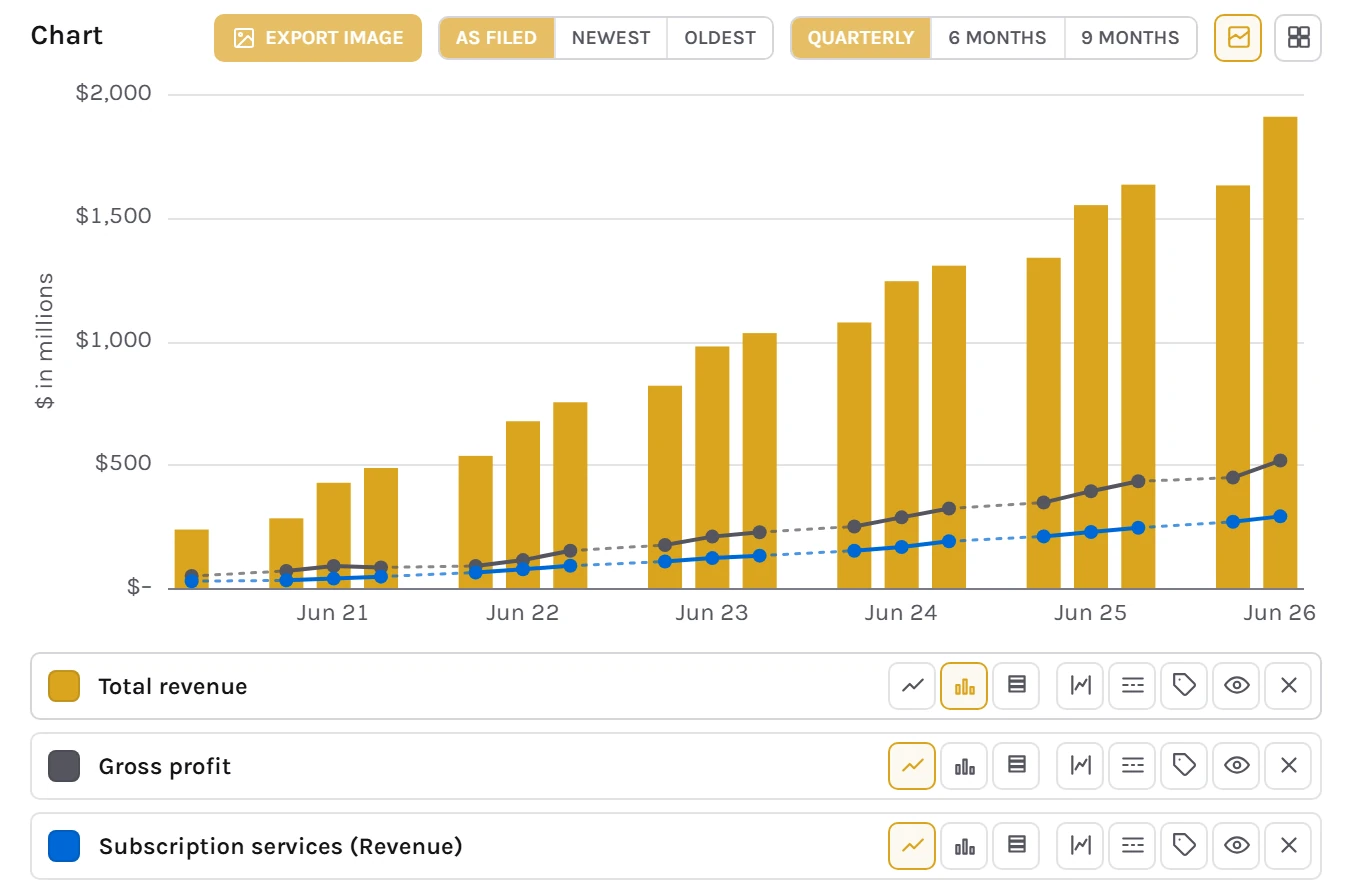
SECSift's chart of Toast's quarterly total revenue as bars, with gross profit and subscription revenue as lines, from its 10-Q filings, September 2020 to June 2026

Read Any Filing on One Clean Page

On EDGAR, every company's 10-K looks different, and finding a table or what matters to you means endless scrolling and searching.

Same Layout for Every Company

Every filing, from every company, rebuilt in the same clean layout without changing a word or number.
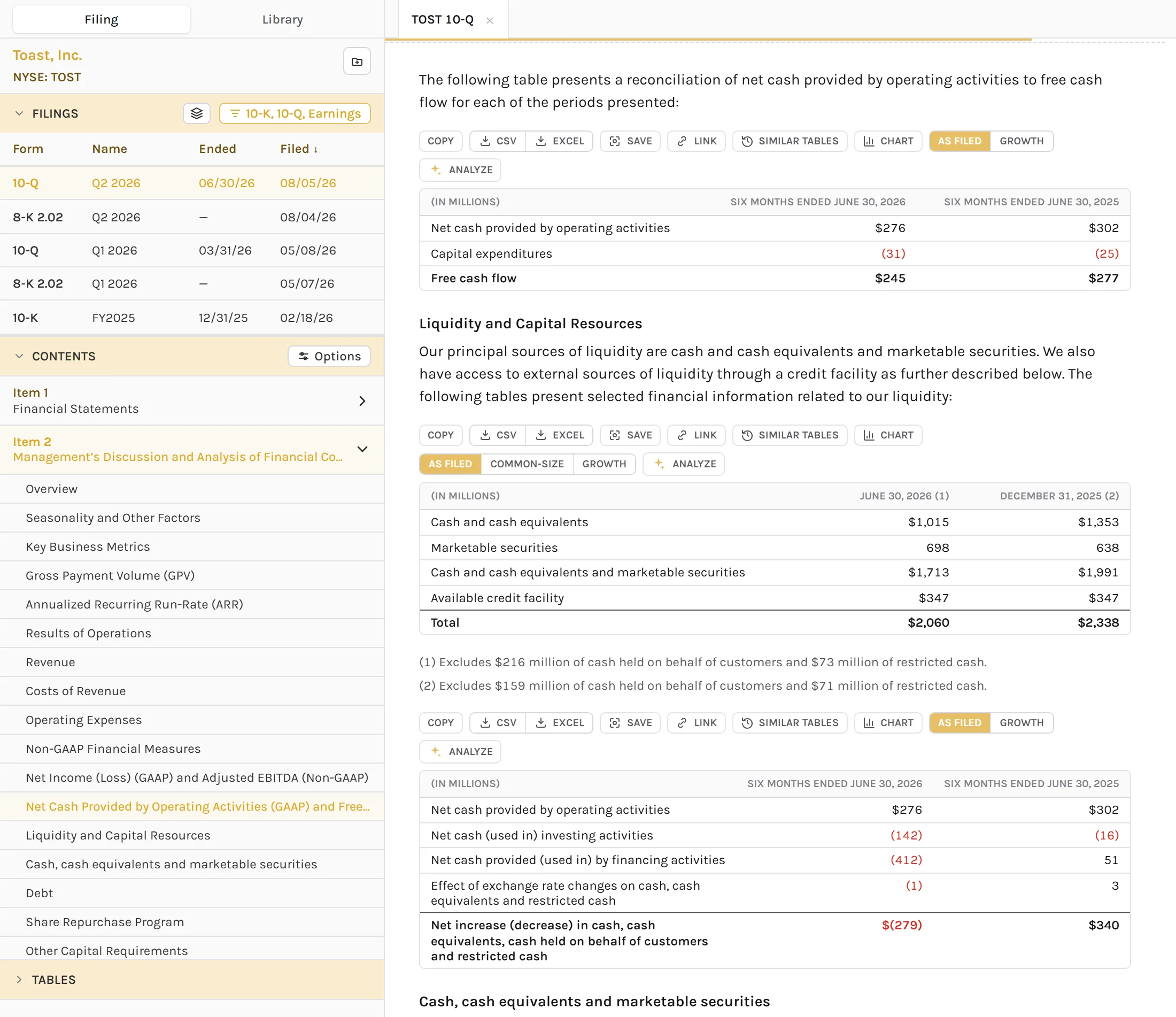
Toast's Q2 2026 10-Q in SECSift: the sidebar's list of Toast's filings and the filing's contents, beside its reconciliation of operating cash flow to free cash flow and its liquidity table, each table with its copy, download, and chart buttons
  • Every form10-Ks, 10-Qs, 8-Ks, DEF 14As, S-1s, 13Fs, and Form 4 filings from 10,000+ companies.
  • Jump anywhereOpen any of the company's filings, or any section, table, or exhibit. On a paid plan, AI names any table or exhibit the filing left unlabeled.
  • Find in filingSearch the whole filing, text and tables, with AND, OR, and NOT. Better than "Ctrl+F".
  • Customize tablesChoose the units and the period order, turn on striped rows, and wrap wide tables.
  • Designed for readingHide images, enable dark mode, mark the original page breaks, and track your place with a progress bar.
  • Mobile friendlyThe same clean layout on a phone, and you can add SECSift to your home screen as a progressive web app (PWA).

Reading is free, with no account. AI names require a paid plan.

Connect to SECSift's MCP Server

Connect SECSift to Claude, ChatGPT, or any MCP client.

Set Up the MCP Server
  • Search every filingSearch the full text of every filing on EDGAR since 2001, with the same filters as the site.
  • Merge tablesMerge a financial table across periods into one grid of aligned numbers.
  • Sift and ask AIRun Sift on a section or a whole filing, and ask questions grounded in the document.
  • Compare filingsAsk what changed since the previous filing, down to the lines added, changed, or removed.
  • Manage alertsRead your alerts, and manage the companies, owners, keywords, and screens you watch.
  • Everything links backEvery answer links to the exact passage on SECSift, so any number is one click from the source.

Requires a free account. Sift and questions cost AI credits.

Set Up the MCP Server

Let AI Do the First Read

Most 10-Ks are over 100 pages long, and much of that's the same legal language every company files. What matters to the thesis is often hidden in a footnote.

Flags on What Matters

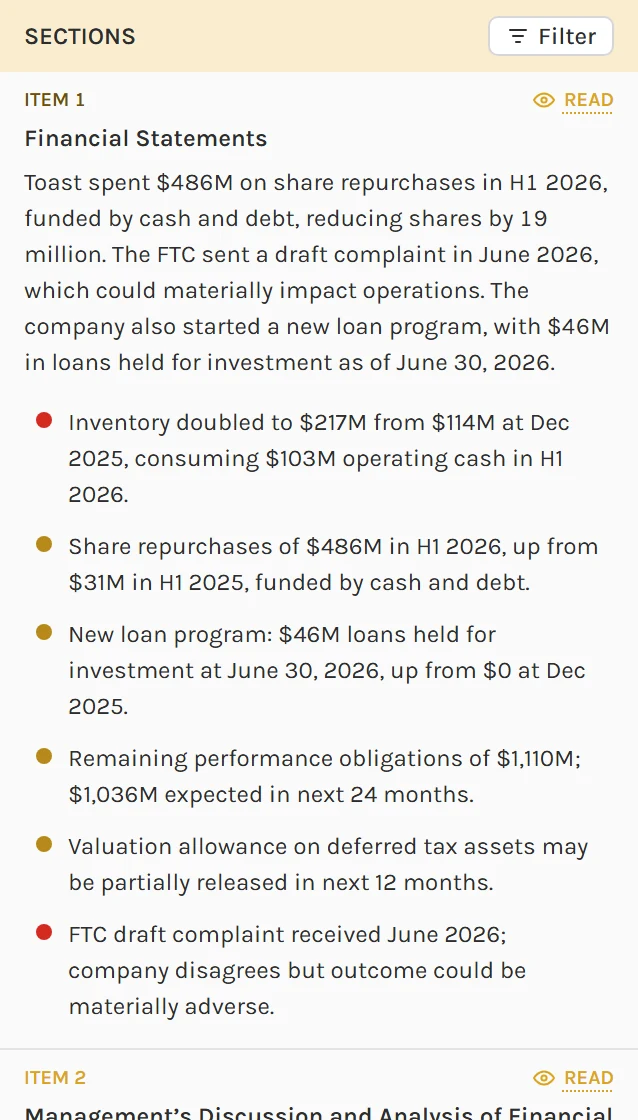
Sift reads every section of the filing, gives each one a verdict, and flags the passages to read first.

Sift's read of Toast's Q2 2026 10-Q: each section's verdict and summary, with its red and gold flags
  • FlagsGreen, yellow, and red flags on the passages that matter most. Jump to those sections first before reading the entire filing.
  • Read, skim, or skipA verdict and a short summary for every section. Optionally collapse the sections marked Skip.
  • Reads like an analystSift AI reads a filing like a seasoned equity analyst, catching what the smartest AI models ignore, and gets smarter every month.
  • Your own flagsFlag any passage yourself as positive, notable, a concern, or routine.

Sift requires a free account, which starts with 100 AI credits.

Boilerplate Fades Out

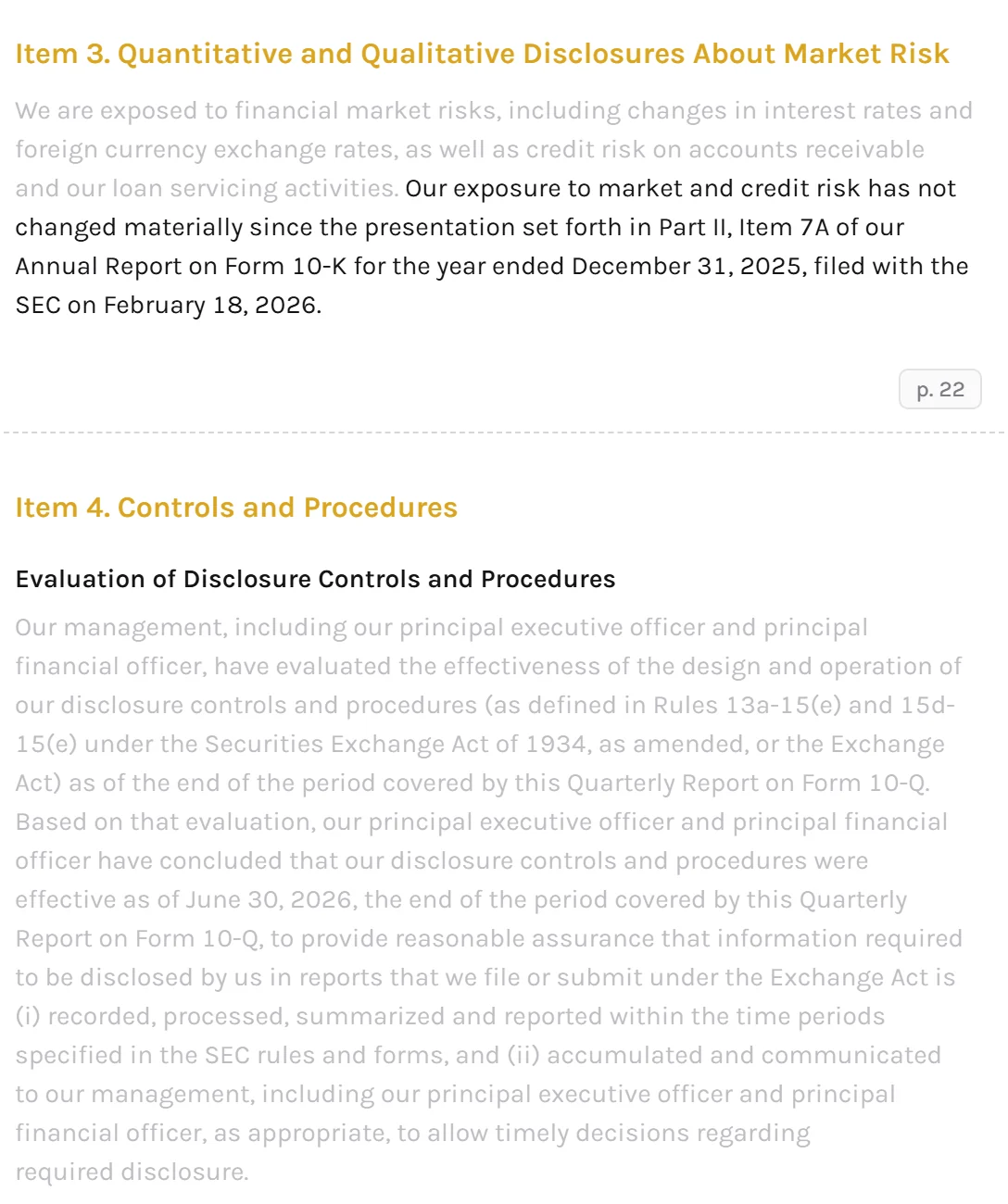
Sift marks the standard legal language every company files, and you choose whether to show, fade, or hide the boilerplate.

Items 3 and 4 of Toast's Q2 2026 10-Q with routine text faded: the standard wording on market risk and on controls grayed out, and the one sentence saying Toast's market risk hasn't changed since its 10-K in full
  • Show, fade, or hideLeave boilerplate as filed, gray it out, or hide every routine passage.
  • SensitivityChoose low, medium, or high. Low marks only the plainest boilerplate, and high marks the most.
  • Search past boilerplateFind in filing can skip the passages Sift marks as boilerplate.

Part of Sift, which requires a free account.

Ask the Filing Anything

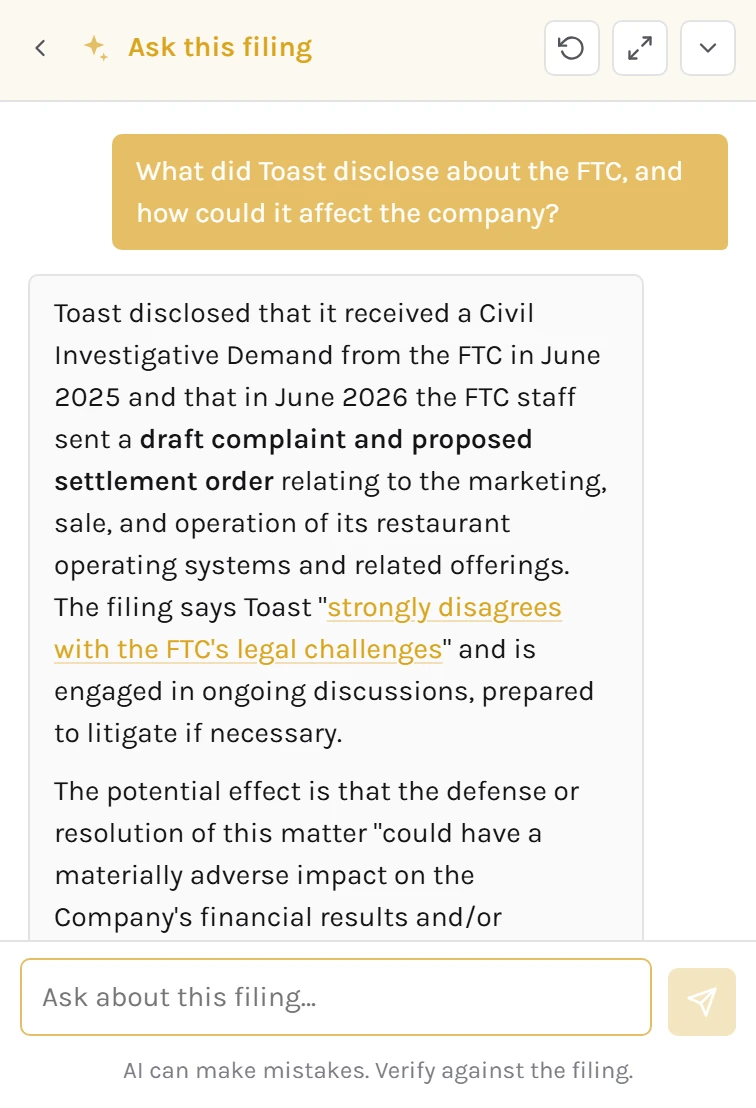
Chat with the whole filing, and every answer links back to the source passage.

Ask this filing on Toast's Q2 2026 10-Q: asked what Toast disclosed about the FTC, the answer quotes the filing and links the quote to its passage
  • Answers with sourcesEach quote in an answer opens the filing at the exact passage.
  • Ask about a passageHighlight any passage to ask the AI about just that text. Paid plans can add their own custom prompts.
  • Analyze a tableOne click gets a short AI summary of a table's most important changes.

Requires a free account.

See What Changed, Share Links, and Save Notes

On EDGAR, finding what's new in a 10-Q means eyeballing it against the previous one. And anything worth sharing or noting ends up being lost in another app.

Compare With the Previous Filing

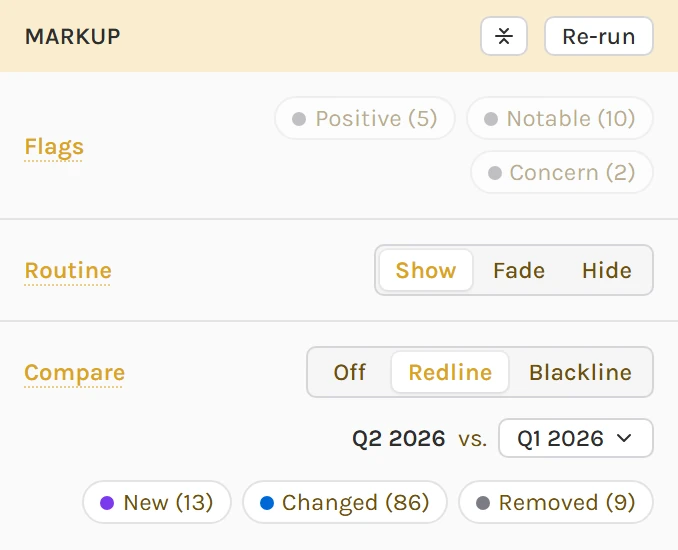
Compare marks what's new, changed, and removed since an earlier filing.

Toast's Q2 2026 10-Q compared with its Q1 2026 10-Q in Redline: a removed passage in gray, changed numbers in blue, and a new paragraph on the FTC in violet, under the side panel with Flags off, Routine on Show, and Compare on Redline with New (13), Changed (86), and Removed (9) all on
  • Marked in the filingNew text in violet, changed in blue, removed in gray.
  • Redline or blacklineRedline marks each change in place. Blackline fades what stayed the same.
  • Changes in tablesNew periods, new lines, and restated numbers stand out.
  • Any earlier filingCompare with the previous filing, or choose another one.

Compare requires a free account.

Share Any Passage and Keep Notes

Share links that open at the exact spot, and keep private notes on the passages you find.

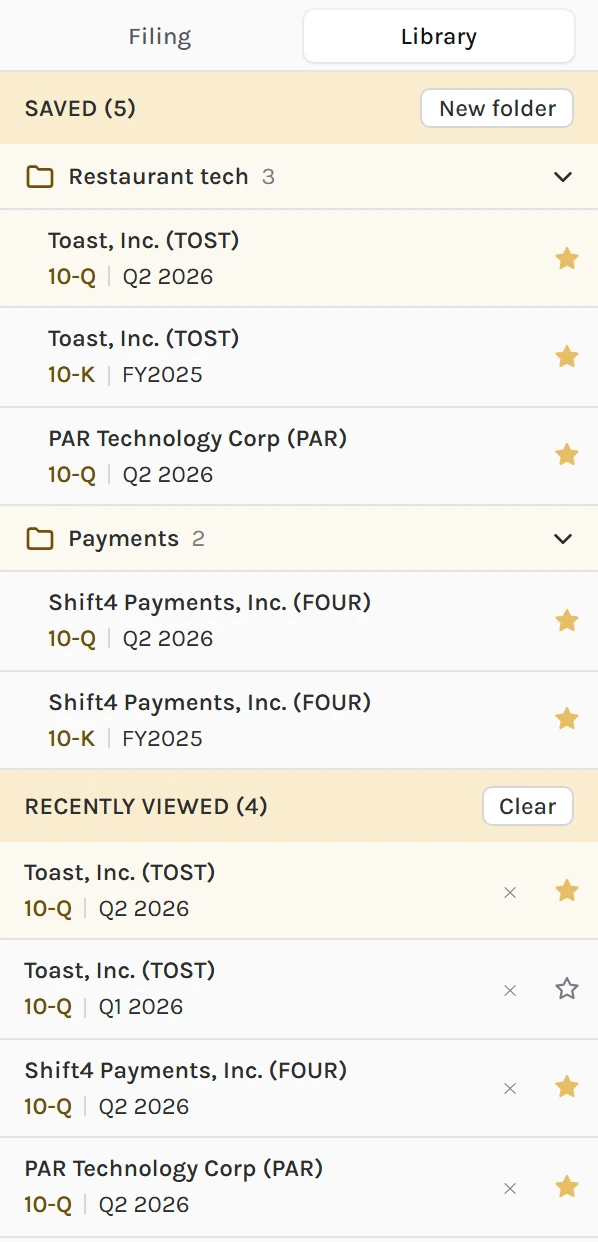
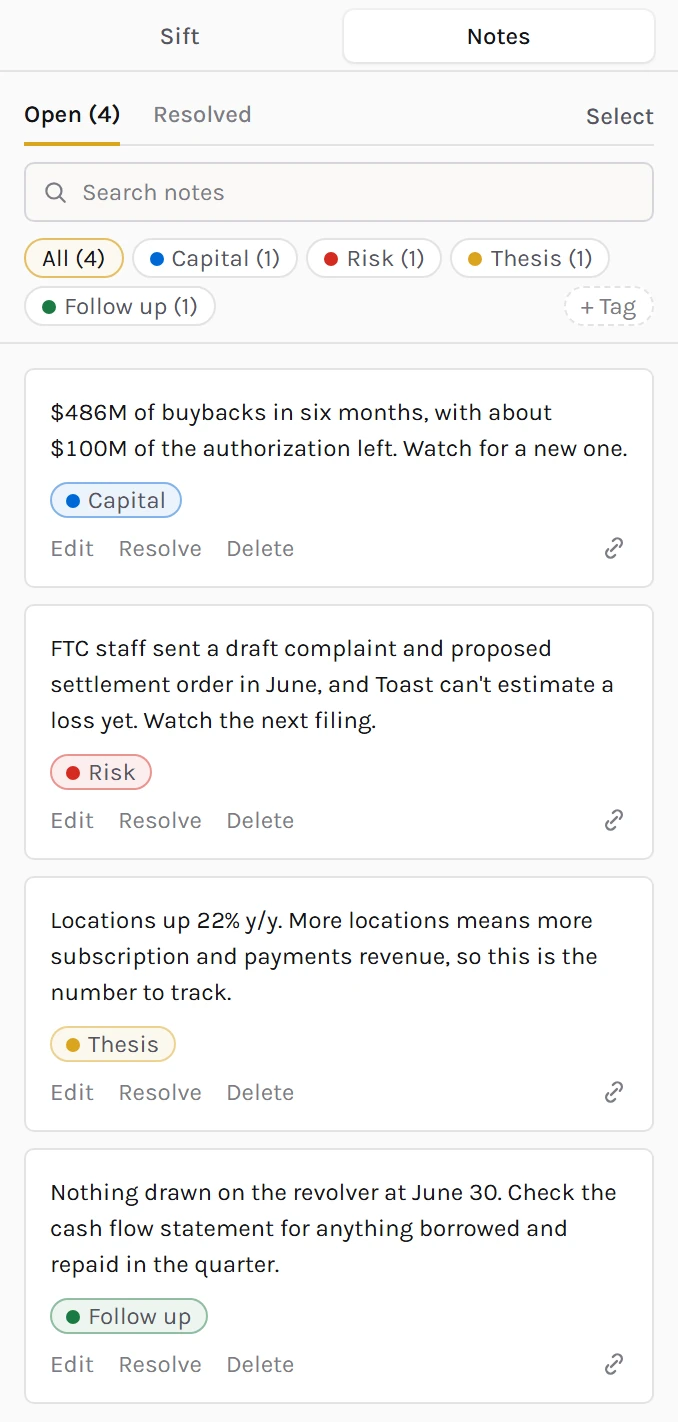
The sidebar's Library tab, with saved Toast, PAR Technology, and Shift4 filings in folders named Restaurant tech and Payments and four recently viewed filings, under the Notes tab on Toast's Q2 2026 10-Q with four tagged notes: Capital, Risk, Thesis, and Follow up
  • Exact-spot linksCopy a link to a filing, a table, or the words you highlighted, and anyone can see exactly what you found, without an account.
  • Private notesNotes on exact passages, synced to your account on every device.
  • TagsColor-tag notes to stay organized, then filter a filing's notes by tag.
  • LibrarySave filings into folders, and find what you read recently in the Library tab.
  • Notes in the PDFOn a paid plan, a PDF export carries your notes as comments.

Anyone can copy and view links. Notes require a free account.

Export Anything Exactly as Filed

Tables copied from EDGAR require manual cleanup. Most stock financial data websites standardize numbers as well. We provide perfectly formatted data and keep everything as filed.

Copy, Merge, and Chart Any Table

Every table exactly as filed, ready to copy, merge across periods, chart in your own style, and export.

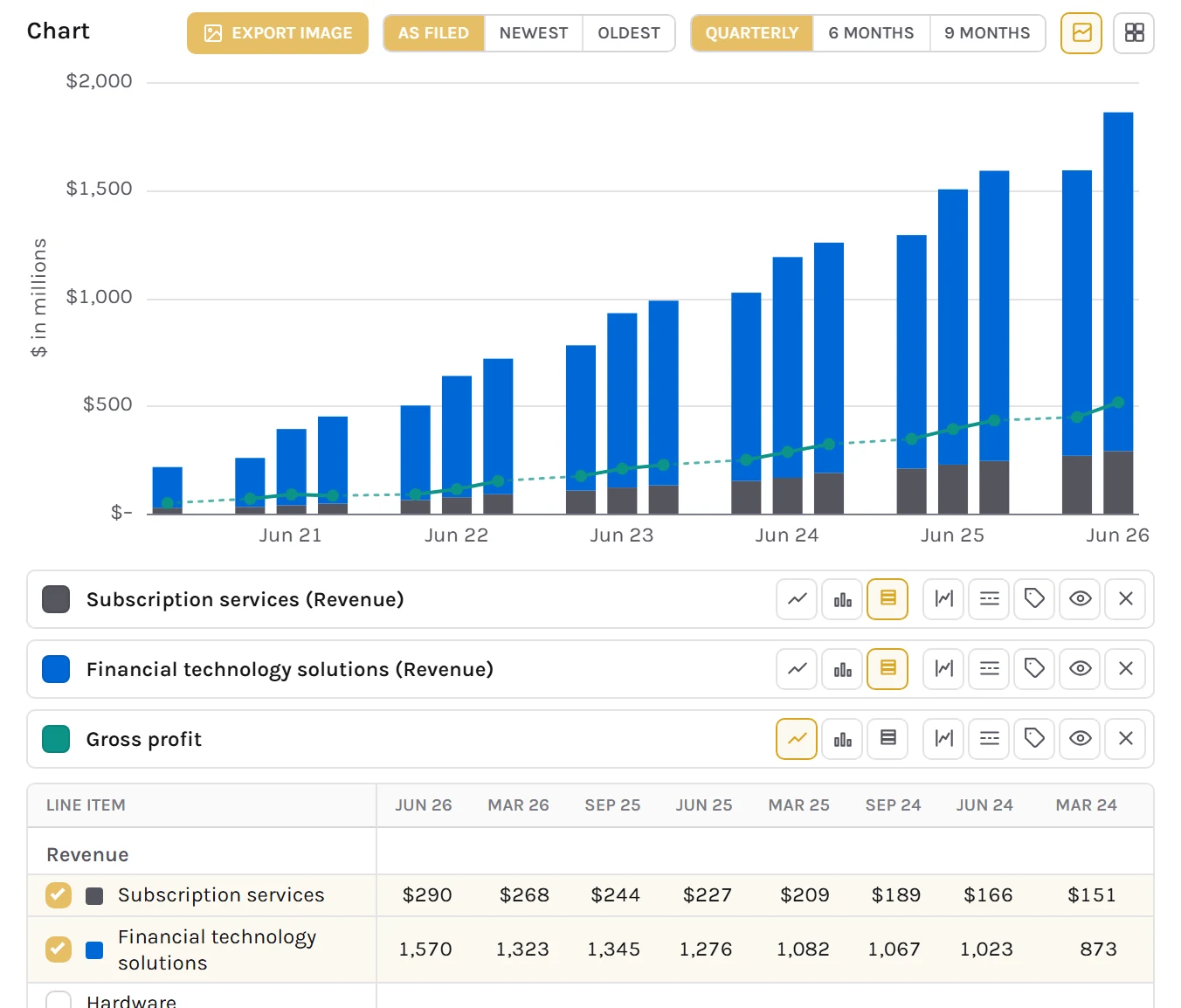
Toast's subscription and fintech revenue stacked by quarter across its 10-Q filings, with gross profit as a line, September 2020 to June 2026, above the income statement lined up across those filings
  • Copy table dataPaste any table into Excel or a doc in one click. It comes out perfectly formatted.
  • Download tablesSave a table as Excel or CSV, with real numbers and a link to the source.
  • Growth and common sizeSwitch any table to growth rates or to a common-size view.
  • Similar tablesFind the same table in the company's other filings. We automatically score them by similarity.
  • Merge tablesCombine one table from several filings into a single grid, one column per period. Choose what to include or exclude.
  • Chart financial dataChart up to 9 rows across filings, customize the chart to your liking, and export as PNG, JPG, or SVG.

Anyone can copy a table or switch its view. Downloads, similar tables, merging, and charts require a paid plan.

Pull Any Filing Into Your Code

Filings, sections, and tables as JSON, exactly as filed. EDGAR's own API gives you the tagged numbers, and raw HTML to parse for everything else.

Read the API Docs
  • Filings and sectionsList a company's filings back to 2001, and pull any single section, like Risk Factors.
  • TablesAny table in JSON or CSV, with the figures parsed for your code.
  • Merge tablesMerge one table across up to 20 filings into a single grid.
  • Full-text searchSearch every filing on EDGAR since 2001 for words or a phrase.
  • ComparisonsSee what's new, changed, and removed since an earlier filing.
  • Daily calls3,000/day on Analyst, 10,000/day on Pro.

Part of the Analyst and Pro plans.

Read the API Docs

Build Your Model in Excel Coming soon

Import any table from any annual or quarterly filing into your workbook, merged across periods, and refresh it when the company files again.

Read the Docs

Part of the Analyst and Pro plans.

  • Import any tableFrom a 10-K, 10-Q, 20-F, or 40-F into any sheet, at the cell you select.
  • AI table namesAI gives every table in a filing a clear, consistent name, so the one you want is easy to find.
  • Merge up to 20 filingsLine up one table across up to 20 recent filings. That means you can go back as far as 20 years with 10-Ks.
  • SECSift formulasPull one figure, a whole table, or a table across filings into a cell. You don't have to memorize formulas, since there's a formula builder.
  • Perfectly formatted for modelingPeriod labels like FY2025, units, colors, borders, and number formats.
  • Workbook tabManage every table you've imported, and jump to or refresh any one of them.
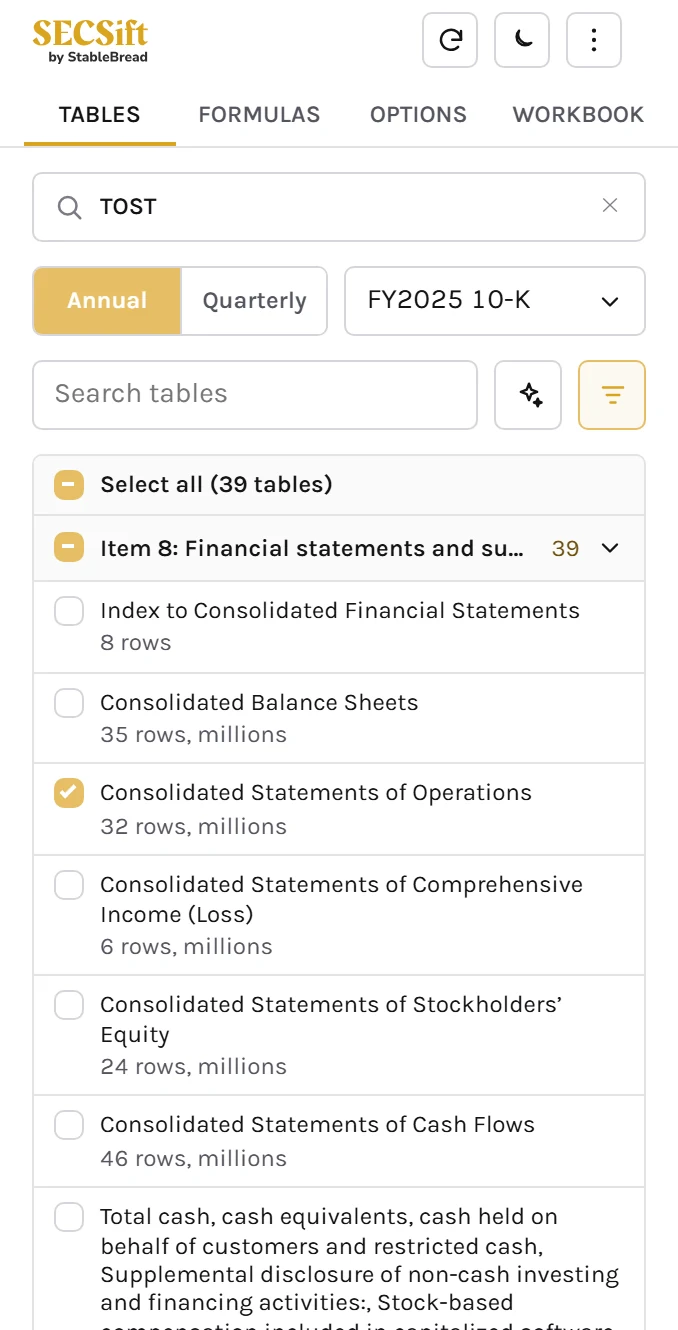
Toast's statement of operations from its last two 10-K filings imported into Excel with the SECSift add-in, FY2022A to FY2025A in the Banker colors, a rule over each subtotal and a double rule under net income, beside the add-in's Tables tab with the table checked

Catch the Filings You Care About

About 3,000 filings land on EDGAR every day, with no easy way to track what you care about. EDGAR's full-text search has limited filters, and its results don't show the exact passage.

Use SECSift in Your Browser

Open filings where investors talk about stocks, search across EDGAR from anywhere, ask AI about any filing, and see your alerts in Chrome.

Add to Chrome
X in its light theme: StableBread's post on $TOST with SECSift's pill under its text, the pill's menu open on Toast's latest 10-K, 10-Q, 8-K, and DEF 14A, then All TOST filings and Ask TOST's filings
  • Twitter/X, Substack, and StocktwitsCashtags like $TOST get a pill that opens Toast's latest filings.
  • SEC EDGARIf you're on SEC EDGAR, jump to any filing or company page on SECSift.
  • Search from anywhereRun a global filing search anytime, or right-click words on any page to search every filing for them.
  • Ask AI from any pageChat with AI about the filings behind any ticker on the page.
  • Alerts on the toolbarSee the alerts you've set up on SECSift from the extension. Select an alert to open the filing.

Pills and the EDGAR buttons work without an account. Search and Ask AI require a free account, and alerts require a paid plan.

Add to Chrome

Get Alerts on Filings You Care About

Watch companies, funds, insiders, phrases, and screens like IPOs. SECSift will email you when a new filing matches.

Alerts are on the Analyst and Pro plans.

  • CompaniesChoose 10-Ks, 10-Qs, 8-Ks, proxies, insider buys and sells, and more.
  • OwnersFollow funds, activist investors, and company executives.
  • KeywordsGet an email when a new filing uses a phrase you follow.
  • ScreensCatch IPO filings, mergers, activist 13Ds, late 10-Ks, and 23 more kinds of filing from any company on EDGAR.
  • DeliveryGet emails as filings come in, or in a digest at the times you choose. Have Sift AI run an automated analysis for you within minutes of a filing hitting EDGAR.
  • InboxEvery alert also lands in your inbox on SECSift, to search, filter, and pin.
The Alerts dialog's inbox with 11 new alerts: Ambarella's 10-Q with 5 concerns and 15 notable, S-1 filings from TCGX Acquisition Corp. II and Regenlab USA, late 10-K notices from America Great Health and VIVIC, Elliott Investment Management's Schedule 13D/A, "going concern" in Aerkomm's and Vitro Biopharma's 10-Qs, and open-market sales by two Ambarella executives

Plans and Pricing

Free For reading filings $0/month   Analyst For active investors $12/month Billed $144/year. Monthly billing: $15/month. Pro For heavy coverage $20/month Billed $240/year. Monthly billing: $30/month.
Read and search any SEC EDGAR filing. Read any filing as one clean page, browse the company's other filings, and search inside a filing with AND, OR, and NOT. Tables come exactly as filed, with growth and common-size views on top.IncludedIncludedIncluded
Sift, Ask AI, and Ask this filing. Sift flags what matters and fades the boilerplate, and Ask AI and Ask this filing answer from the filing itself, with sources. Each spends AI credits.IncludedIncludedIncluded
AI credits. Each AI feature spends its own number of credits. On Standard, a Sift run costs 3 to 10 by filing size and a chat message 3, and the Pro and Max models cost 10x and 30x as much. Reading, searching, and comparing never spend credits, and top-ups never expire.100 to startTop-ups: $10 for 250Models: Standard1,000/monthTop-ups: $6 for 250Models: Standard, Pro, and Max3,000/monthTop-ups: $5 for 250Models: Standard, Pro, and Max
Compare against previous filings. Marks what's new, changed, and removed since an earlier filing, right in the document.IncludedIncludedIncluded
Global filings search. Search every filing on EDGAR since 2001 for a word or phrase. A search usually takes one or two requests.50 requests/day500 requests/day1,500 requests/day
Watchlist and keyword alerts. An email when a company, fund, or owner you watch files, or when a new filing uses a phrase you follow.NVDA, BABA, and CELHUp to 3 keywordsUp to 25 watchedUp to 10 keywordsUp to 100 watchedUp to 30 keywords
Saved filings, folders, notes, and chats. Save filings to your library in folders you name, keep notes on the passages you highlight, and come back to each filing's chat, in the reader or the Chrome extension.Up to 10 filings in 3 folders20 notes a filingLast 10 chatsUp to 120 filings in 100 folders100 notes a filingLast 120 chatsUp to 250 filings in 200 folders300 notes a filingLast 250 chats
Copy tables and save them as images. Paste any table into Excel or a doc in one click, or save it as a PNG stamped with the company, the filing, and the source.IncludedIncludedIncluded
Merge, chart, and download tables as CSV or Excel. Merge a table across filings, chart its rows, and download any table as CSV or Excel.NVDA, BABA, and CELHIncludedIncluded
Export filings as Markdown or PDF. Download a whole filing as Markdown, or as a PDF that carries your notes as comments.MarkdownPDF for NVDA, BABA, and CELHMarkdown and PDFMarkdown and PDF
Share links to anything. Link to a filing, a table, or the words you highlighted. The link opens for anyone, at exactly that spot.IncludedIncludedIncluded
MCP server. Use SECSift from Claude, ChatGPT, or any MCP client, with the same credits as the site.250 calls/day5,000 calls/day10,000 calls/day
API access. Pull filings, sections, and tables into your own code as JSON.100 calls/dayNVDA, BABA, and CELH3,000 calls/day10,000 calls/day
Excel add-in. Import any table into your workbook and pull figures into your model with formulas. The add-in's calls count toward the API's.Coming soonNVDA, BABA, and CELHComing soonComing soon
Chrome extension. Open filings from cashtags on Twitter/X, Substack, and Stocktwits, and from EDGAR. The pills and EDGAR buttons work without an account, and the extension shows your account's alerts.With alertsNVDA, BABA, and CELHWith alertsWith alerts
Custom prompts, plus AI names for tables and exhibits. Write your own Ask AI prompts, and have AI name the tables and exhibits a filing left unlabeled.NVDA, BABA, and CELHIncludedIncluded

Still have questions? !

Create Your Free Account

Free accounts get 100 AI credits, filing search, comparisons, saved notes and filings, and MCP server access. They also get every premium feature for NVDA, BABA, and CELH, with lower limits.